
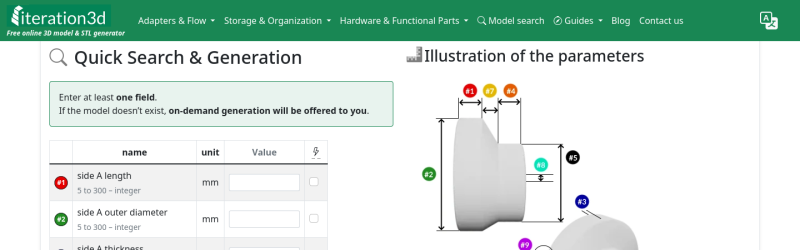
It’s happened to all of us: you find the perfect model for your needs — a bracket, a box, a cable clip, but it only comes in STL, and doesn’t quite fit. That problem will never happen if you’re using Iteration3D to get your models, because every single thing on the site is fully-parametric, thanks to an open-source toolchain leveraging 123Dbuilds and Blender.
Blender gives you preview renderings, including colors where the models are set up for multi-material printing. Build123D is the CAD behind the curtain — if you haven’t heard of it, think OpenSCAD but in Python, but with chamfers and fillets. It actually leverages the same OpenCascade that’s behind everyone’s other favorite open-source CAD suite, FreeCAD. Anything you can do in FreeCAD, you can do in Build123D, but with code. Except you don’t need to learn the code if the model is on Iteration3D; you just set the parameters and push a button to get an STL of your exact specifications.
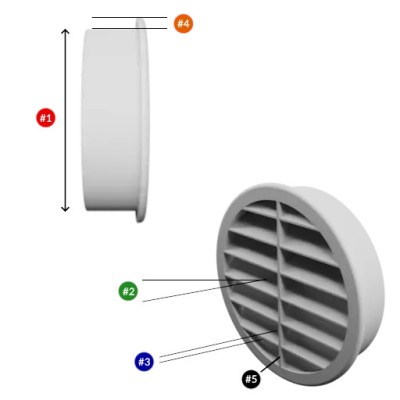 The downside is that, as of now, you are limited to the hard-coded templates provided by Iteration3D. You can modify their parameters to get the configuration and dimensions you need, but not the pythonic Build123D script that generates them. Nor can you currently upload your own models to be shared and parametrically altered, like Thingiverse had with their OpenSCAD-based customizer. That said, we were told that user-uploads are in the pipeline, which is great news and may well turn Iteration3D into our new favorite.
Right now, if you’re looking for a box or a pipe hanger or a bracket, plugging your numbers into Iteration3D’s model generator is going to be a lot faster than rolling your own, weather that rolling be done in OpenSCAD, FreeCAD, or one of those bits of software people insist on paying for. There’s a good variety of templates — 18 so far — so it’s worth checking out. Iteration3D is still new, having started in early 2025, so we will watch their career with great interest.
Going back to the problem in the introduction, if Iteration3D doesn’t have what you need and you still have an STL you need to change the dimensions of, we can help you with that.
Thanks to [Sylvain] for the tip!










All python is parametric XD
If i limit myself to a tiny library of “templates” then any cad software is that easy. The only reason openscad is more work than this is that i can make the shape i want instead of the shape that was already made for me.
you should check https://build123d.readthedocs.io/en/latest/ even if you´re not frustrated with OpenSCAD
Thx, that info was missing in the article.
“Anything you can do in FreeCAD, you can do in Build123D, but with code.”
You can use FreeCAD as a huge Python library for using OCC, so this is also true of FreeCAD. ☺
It’s true that FreeCAD has a Python API but it wasn’t designed as a primary method to create models – maybe analogous to programming in assembly language. Here is an example of build123d code to create a Cast Bearing Unit with a draft (from the build123d docs: https://build123d.readthedocs.io/en/latest/examples_1.html#cast-bearing-unit):
 from build123d import *
 from ocp_vscode import show
A, A1, Db2, H, J = 26, 11, 57, 98.5, 76.5
with BuildPart() as oval_flanged_bearing_unit:
with BuildSketch() as plan:
housing = Circle(Db2 / 2)
with GridLocations(J, 0, 2, 1) as bolt_centers:
Circle((H - J) / 2)
make_hull()
extrude(amount=A1)
extrude(housing, amount=A)
drafted_faces = oval_flanged_bearing_unit.faces().filter_by(Axis.Z, reverse=True)
draft(drafted_faces, Plane.XY, 4)
fillet(oval_flanged_bearing_unit.edges(), 1)
with Locations(oval_flanged_bearing_unit.faces().sort_by(Axis.Z)[-1]):
CounterBoreHole(14 / 2, 47 / 2, 14)
with Locations(*bolt_centers):
Hole(5)
oval_flanged_bearing_unit.part.color = Color(0x4C6377)
show(oval_flanged_bearing_unit)
This is interesting!
I wonder how Build123D compares to CADquery, which is also a Python-based and uses the same OCCT kernel.
I now see Build123 actually has a section on this in their docs. Neat!
but why the text summary? See if you can figure out what the object described below is:
“Oval coupling in STL 3D file format. On side A, the internal cross-section is 120×60 mm, whereas on side B it is 70×30 mm. The useful sleeve length on side A is 100 mm, while on side B it reaches 20 mm. The transition section is 30 mm long, for a final overall length of 150 mm. Both the inner and outer edges at the ends remain unchamfered.”
If you’re working in this space, please stop doing this! Draw a dang old picture! (not a criticism of Iteration3D directly, but for similar tools / AI in general)
I don’t see the benefit to this being “in the cloud” rather than local (where you can use it without connectivity, or after they decide to alter the terms of service in some exploitative way). Maybe I’m just a stick in the mud, but I’ve seen far to many cloud/SaaS offerings vanish, change their pricing or ToS, sell user data, etc. to ever consider including anything I can’t run autonomously in my workflows.
For me, if the STL is not quite right I’ll drill, file, sand, or trim the 3D printed result. Or I’ll load the STL into OpenSCAD and make alterations programmatically until I get what I want, then print it.
OpenSCAD only exports STL though..