Wolfram Function Repository
Instant-use add-on functions for the Wolfram Language
Function Repository Resource:
Save a notebook to a file that is formatted to maximize readability when viewing changes in version control systems
ResourceFunction["SaveReadableNotebook"][notebook,"file"] saves notebook to "file" as a Notebook expression formatted for readability. |
| Notebook[…] | a notebook expression |
| NotebookObject[…] | a currently open notebook |
| "path" | a pathname of a saved notebook |
| "ExcludedCellOptions" | {CellChangeTimes,ExpressionUUID} | cell options that should be discarded from the saved notebook |
| "ExcludedNotebookOptions" | {WindowSize,WindowMargins} | notebook options that should be discarded |
Save a NotebookObject to a human-readable file:
| In[1]:= | ![nb = CreateDocument[{ TextCell["Test notebook", "Title"], TextCell["This is a test", "Text"], ExpressionCell[Defer[1 + 1], "Input"], ExpressionCell[2, "Output"] }]](https://www.wolframcloud.com/obj/resourcesystem/images/04c/04cc599a-fc56-410f-9a4f-dda65e163f9b/56878034a778defb.png) |
| Out[1]= |  |
| In[2]:= | ![ResourceFunction["SaveReadableNotebook"][nb, FileNameJoin[{$TemporaryDirectory, "readable.nb"}]]](https://www.wolframcloud.com/obj/resourcesystem/images/04c/04cc599a-fc56-410f-9a4f-dda65e163f9b/17ce3dff200f7f51.png) |
| Out[2]= |  |
| In[3]:= | ![FilePrint[%]](https://www.wolframcloud.com/obj/resourcesystem/images/04c/04cc599a-fc56-410f-9a4f-dda65e163f9b/373092da9d5f970d.png) |

Save a Notebook expression:
| In[4]:= | ![ResourceFunction["SaveReadableNotebook"][ Notebook[{Cell["Hello world", "Text"]}], FileNameJoin[{$TemporaryDirectory, "readable.nb"}] ]](https://www.wolframcloud.com/obj/resourcesystem/images/04c/04cc599a-fc56-410f-9a4f-dda65e163f9b/26eedd0e29131f87.png) |
| Out[4]= |  |
| In[5]:= | ![FilePrint[%]](https://www.wolframcloud.com/obj/resourcesystem/images/04c/04cc599a-fc56-410f-9a4f-dda65e163f9b/1e58fd6c6dbdba93.png) |

Save a copy of a notebook file that already exists:
| In[6]:= | ![ResourceFunction["SaveReadableNotebook"][ FindFile["ExampleData/document.nb"], FileNameJoin[{$TemporaryDirectory, "readable.nb"}] ]](https://www.wolframcloud.com/obj/resourcesystem/images/04c/04cc599a-fc56-410f-9a4f-dda65e163f9b/06486f6989cb5eb1.png) |
| Out[6]= |  |
| In[7]:= | ![FilePrint[%, 20]](https://www.wolframcloud.com/obj/resourcesystem/images/04c/04cc599a-fc56-410f-9a4f-dda65e163f9b/072137780e78da2c.png) |

By default, some cell options are automatically stripped:
| In[8]:= | ![ResourceFunction["SaveReadableNotebook"][ Notebook[{Cell["Hello world", "Text", ExpressionUUID -> CreateUUID[]]}], FileNameJoin[{$TemporaryDirectory, "readable.nb"}] ] // FilePrint](https://www.wolframcloud.com/obj/resourcesystem/images/04c/04cc599a-fc56-410f-9a4f-dda65e163f9b/564963d8c7293e69.png) |

Preserve all cell options:
| In[9]:= | ![ResourceFunction["SaveReadableNotebook"][ Notebook[{Cell["Hello world", "Text", ExpressionUUID -> CreateUUID[]]}], FileNameJoin[{$TemporaryDirectory, "readable.nb"}], "ExcludedCellOptions" -> {} ] // FilePrint](https://www.wolframcloud.com/obj/resourcesystem/images/04c/04cc599a-fc56-410f-9a4f-dda65e163f9b/53aa5bd4722352e5.png) |

Ignore specific options:
| In[10]:= | ![ResourceFunction["SaveReadableNotebook"][ Notebook[{Cell["Hello world", "Text", FontColor -> Red, FontSize -> 14]}], FileNameJoin[{$TemporaryDirectory, "readable.nb"}], "ExcludedCellOptions" -> {FontColor} ] // FilePrint](https://www.wolframcloud.com/obj/resourcesystem/images/04c/04cc599a-fc56-410f-9a4f-dda65e163f9b/6f256e0edaf82e05.png) |

By default, some notebook options are automatically stripped:
| In[11]:= | ![ResourceFunction["SaveReadableNotebook"][ Notebook[{Cell["Hello world", "Text"]}, WindowSize -> {1000, 1000}], FileNameJoin[{$TemporaryDirectory, "readable.nb"}] ] // FilePrint](https://www.wolframcloud.com/obj/resourcesystem/images/04c/04cc599a-fc56-410f-9a4f-dda65e163f9b/22b120a06f04692a.png) |

Preserve all notebook options:
| In[12]:= | ![ResourceFunction["SaveReadableNotebook"][ Notebook[{Cell["Hello world", "Text"]}, WindowSize -> {1000, 1000}], FileNameJoin[{$TemporaryDirectory, "readable.nb"}], "ExcludedNotebookOptions" -> {} ] // FilePrint](https://www.wolframcloud.com/obj/resourcesystem/images/04c/04cc599a-fc56-410f-9a4f-dda65e163f9b/491c26fbf61ba147.png) |

Ignore specific options:
| In[13]:= | ![ResourceFunction["SaveReadableNotebook"][ Notebook[{Cell["Hello world", "Text"]}, Background -> Red], FileNameJoin[{$TemporaryDirectory, "readable.nb"}], "ExcludedNotebookOptions" -> {Background} ] // FilePrint](https://www.wolframcloud.com/obj/resourcesystem/images/04c/04cc599a-fc56-410f-9a4f-dda65e163f9b/7846c2b54fb3029f.png) |

SaveReadableNotebook can be used to create notebook files that are well suited for version control systems that look at changes to files on a line-by-line basis.
Here’s a test notebook:
| In[14]:= | ![nb = NotebookPut@Notebook[{ Cell["Test notebook", "Title"], Cell["This is a test.", "Text"], Cell[BoxData[RowBox[{"1", "+", "1"}]], "Input"], Cell[BoxData["2"], "Output"] }]; NotebookSave[nb, FileNameJoin[{$TemporaryDirectory, "original.nb"}]];](https://www.wolframcloud.com/obj/resourcesystem/images/04c/04cc599a-fc56-410f-9a4f-dda65e163f9b/751731742ecf722a.png) |
Now make changes to the notebook, then save to a new file:
| In[15]:= | ![NotebookSave[nb, FileNameJoin[{$TemporaryDirectory, "changed.nb"}]];](https://www.wolframcloud.com/obj/resourcesystem/images/04c/04cc599a-fc56-410f-9a4f-dda65e163f9b/27ff1e0133dfbb9a.png) |
It can be difficult to visualize what actually changed:
| In[16]:= | ![fileDiff[file1_, file2_, max_ : Infinity] := Column@Take[ Flatten@Replace[ SequenceAlignment[Import[file1, "Lines"], Import[file2, "Lines"]], {{a___String}, {b___String}} :> Grid[{ {Item[StringRiffle[{a}, "\n"], Background -> LightRed]}, {Item[StringRiffle[{b}, "\n"], Background -> LightGreen]} }], {1} ], UpTo[max] ];](https://www.wolframcloud.com/obj/resourcesystem/images/04c/04cc599a-fc56-410f-9a4f-dda65e163f9b/1d8985e42297fe43.png) |
| In[17]:= | ![fileDiff[ FileNameJoin[{$TemporaryDirectory, "original.nb"}], FileNameJoin[{$TemporaryDirectory, "changed.nb"}] ]](https://www.wolframcloud.com/obj/resourcesystem/images/04c/04cc599a-fc56-410f-9a4f-dda65e163f9b/704b2d4bc8931319.png) |
| Out[17]= | 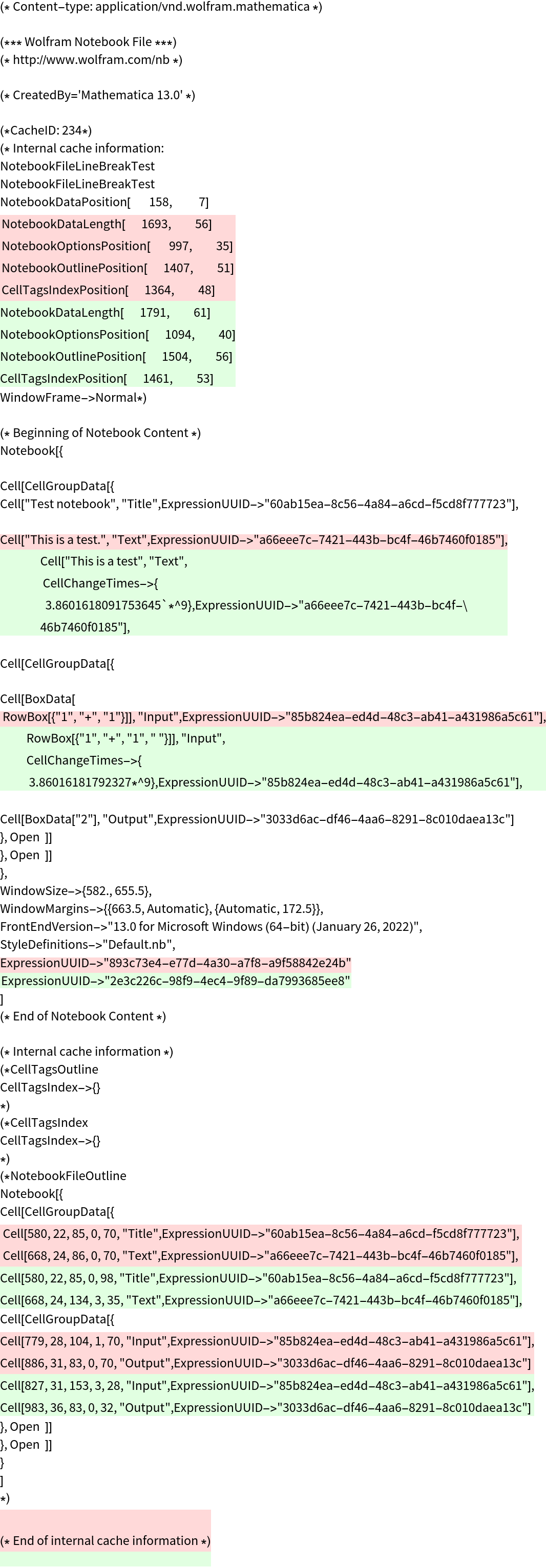 |
Create a formatted version of each notebook and view changes for those files instead:
| In[18]:= | ![ResourceFunction["SaveReadableNotebook"][ FileNameJoin[{$TemporaryDirectory, "original.nb"}], FileNameJoin[{$TemporaryDirectory, "original_readable.nb"}] ]; ResourceFunction["SaveReadableNotebook"][ FileNameJoin[{$TemporaryDirectory, "changed.nb"}], FileNameJoin[{$TemporaryDirectory, "changed_readable.nb"}] ]; fileDiff[ FileNameJoin[{$TemporaryDirectory, "original_readable.nb"}], FileNameJoin[{$TemporaryDirectory, "changed_readable.nb"}] ]](https://www.wolframcloud.com/obj/resourcesystem/images/04c/04cc599a-fc56-410f-9a4f-dda65e163f9b/18cc84cf331837eb.png) |
| Out[20]= | 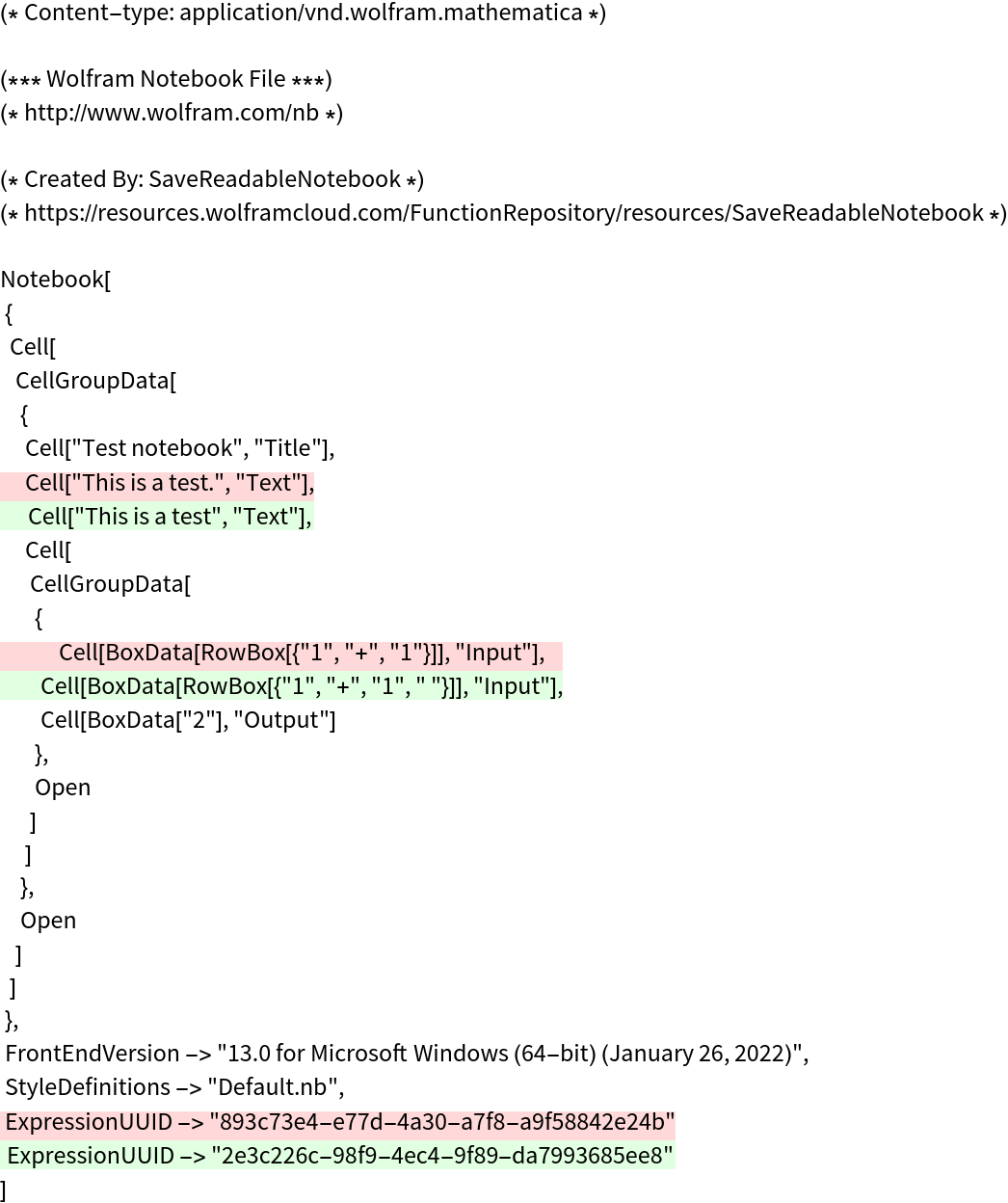 |
The formatted notebook files still open normally:
| In[21]:= | ![NotebookOpen[ FileNameJoin[{$TemporaryDirectory, "changed_readable.nb"}]]](https://www.wolframcloud.com/obj/resourcesystem/images/04c/04cc599a-fc56-410f-9a4f-dda65e163f9b/31638874f3871d96.png) |
| Out[21]= |  |
Wolfram Language 11.3 (March 2018) or above
This work is licensed under a Creative Commons Attribution 4.0 International License