HTTP & Web
Performing HTTP requests to other services
This document will show you how to perform HTTP requests to other services.
What you will build
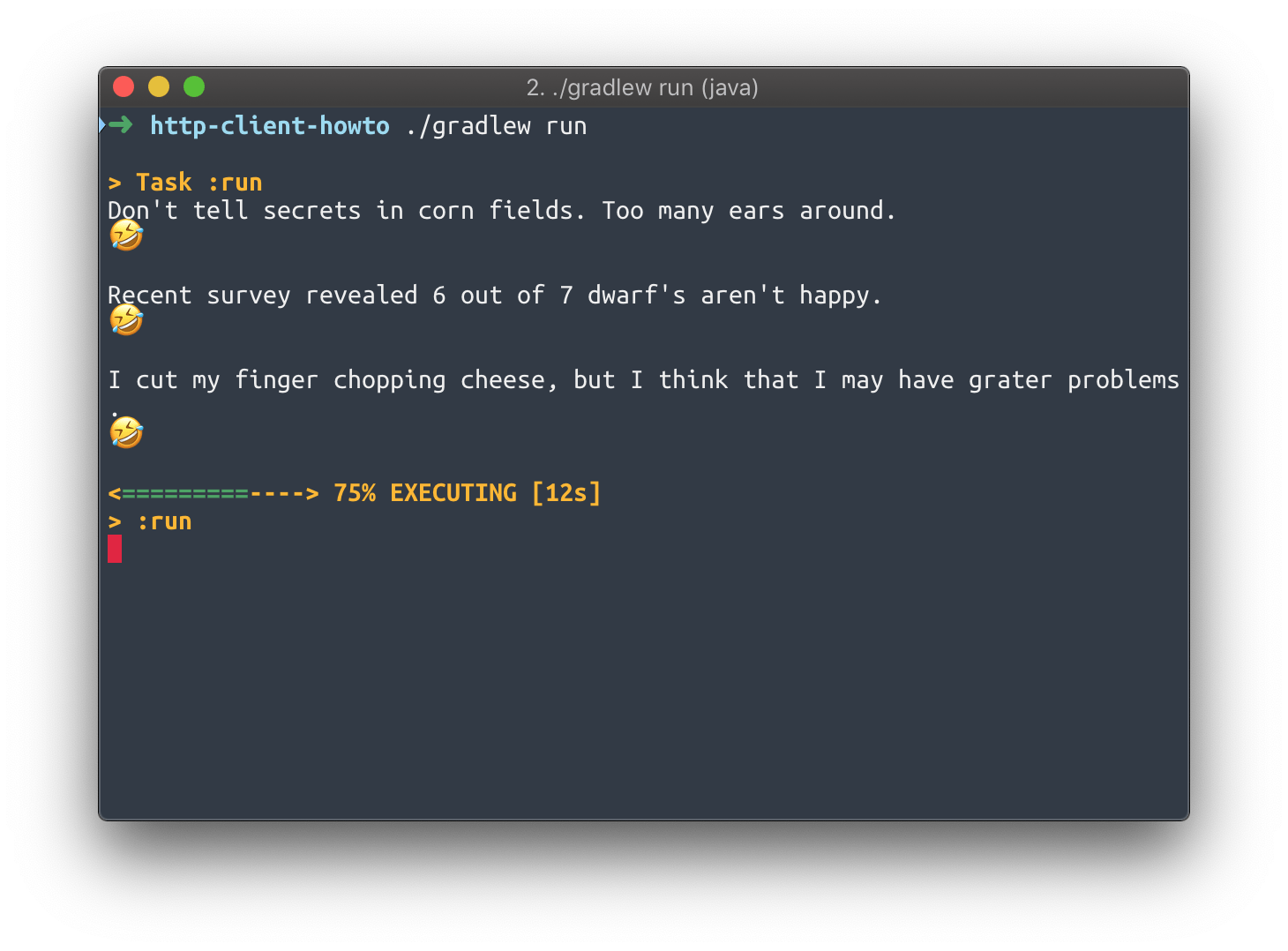
You will build a Vert.x application that use the API at https://icanhazdadjoke.com/api and displays a new joke every 3 seconds:
The application fits in a single JokeVerticle class.
What you need
-
A text editor or IDE
-
Java 11 or higher
-
Maven or Gradle
Create a project
The code of this project contains Maven and Gradle build files that are functionally equivalent.
Using Maven
Here is the content of the pom.xml file you should be using:
Maven
pom.xml<?xml version="1.0" encoding="UTF-8"?> <project xmlns="http://maven.apache.org/POM/4.0.0" xmlns:xsi="http://www.w3.org/2001/XMLSchema-instance" xsi:schemaLocation="http://maven.apache.org/POM/4.0.0 http://maven.apache.org/xsd/maven-4.0.0.xsd"> <modelVersion>4.0.0</modelVersion> <groupId>io.vertx.howtos</groupId> <artifactId>http-client-howto</artifactId> <version>1.0-SNAPSHOT</version> <properties> <vertx.version>5.0.0.CR2</vertx.version> <project.build.sourceEncoding>UTF-8</project.build.sourceEncoding> </properties> <dependencyManagement> <dependencies> <dependency> <groupId>io.vertx</groupId> <artifactId>vertx-stack-depchain</artifactId> <version>${vertx.version}</version> <type>pom</type> <scope>import</scope> </dependency> </dependencies> </dependencyManagement> <dependencies> <dependency> <groupId>io.vertx</groupId> <artifactId>vertx-core</artifactId> </dependency> <dependency> <groupId>io.vertx</groupId> <artifactId>vertx-web-client</artifactId> </dependency> </dependencies> <build> <plugins> <plugin> <groupId>org.apache.maven.plugins</groupId> <artifactId>maven-compiler-plugin</artifactId> <version>3.13.0</version> <configuration> <release>11</release> </configuration> </plugin> <plugin> <groupId>org.codehaus.mojo</groupId> <artifactId>exec-maven-plugin</artifactId> <version>3.5.0</version> <configuration> <mainClass>io.vertx.howtos.httpclient.JokeVerticle</mainClass> </configuration> </plugin> </plugins> </build> </project>Using Gradle
Assuming you use Gradle with the Kotlin DSL, here is what your build.gradle.kts file should look like:
Gradle
build.gradle.ktsplugins { java application } repositories { mavenCentral() } dependencies { val vertxVersion = "5.0.0.CR2" implementation("io.vertx:vertx-core:${vertxVersion}") implementation("io.vertx:vertx-web-client:${vertxVersion}") } application { mainClass = "io.vertx.howtos.httpclient.JokeVerticle" }Getting jokes with the Vert.x web client
The Vert.x web client greatly simplifies making HTTP requests compared to the more low-level API found in the Vert.x core API. It does The WebClient class can be found in the io.vertx:vertx-web-client artifact.
To get new jokes, we need to make HTTP GET requests to https://icanhazdadjoke.com/api. To do that every 3 seconds, we will simply use a Vert.x periodic timer.
The API returns simple JSON objects. We can test it using a command-line tool like curl:
$ curl -H "Accept: application/json" https://icanhazdadjoke.com/ {"id":"IJBAsrrzPmb","joke":"What do you call a cow with two legs? Lean beef.","status":200} Here is the code of the JokeVerticle class:
package io.vertx.howtos.httpclient; import io.vertx.core.AbstractVerticle; import io.vertx.core.Vertx; import io.vertx.core.http.HttpResponseExpectation; import io.vertx.core.json.JsonObject; import io.vertx.ext.web.client.HttpRequest; import io.vertx.ext.web.client.WebClient; import io.vertx.ext.web.codec.BodyCodec; public class JokeVerticle extends AbstractVerticle { private HttpRequest<JsonObject> request; @Override public void start() { request = WebClient.create(vertx) (1) .get(443, "icanhazdadjoke.com", "/") (2) .ssl(true) (3) .putHeader("Accept", "application/json") (4) .as(BodyCodec.jsonObject()); (5) vertx.setPeriodic(3000, id -> fetchJoke()); } private void fetchJoke() { request.send() .expecting(HttpResponseExpectation.SC_OK) (6) .onSuccess(result -> { System.out.println(result.body().getString("joke")); (7) System.out.println("🤣"); System.out.println(); }) .onFailure(e -> System.out.println("No joke fetched: " + e.getMessage())); } public static void main(String[] args) { Vertx vertx = Vertx.vertx(); vertx.deployVerticle(new JokeVerticle()).await(); } }| 1 | Get a WebClient attached to the current Vert.x instance. |
| 2 | HTTP GET request for path / to host icanhazdadjoke.com, on port 443 (HTTPS). |
| 3 | Do not forget to enable SSL encryption. |
| 4 | Explicitly say that we want JSON data. |
| 5 | The response will automatically be converted to JSON. |
| 6 | We expect an HTTP 200 status code, else it will fail the response. |
| 7 | The body is a JSON object, and we write the result to the console. |
Running the application
The JokeVerticle already has a main method, so it can be used as-is to:
-
create a
Vertxcontext, then -
deploy
JokeVerticle.
You can run the application from:
-
your IDE, by running the
mainmethod from theJokeVerticleclass, or -
with Maven:
mvn compile exec:java, or -
with Gradle:
./gradlew run(Linux, macOS) orgradle run(Windows).
Summary
This document covered:
-
the Vert.x web client for making HTTP requests,
-
extracting data from a JSON response,
-
Vert.x periodic tasks.