In this tutorial, we will learn how to build a full stack Angular 16 + Spring Boot + MongoDB example with a CRUD App. The back-end server uses Spring Boot with Spring Web MVC for REST Controller and Spring Data MongoDB for interacting with MongoDB database. Front-end side is made with Angular 16, HttpClient & Router.
More Practice:
– Angular + Spring Boot: Pagination example
– Angular 16 + Spring Boot: JWT Authentication example
– Angular 16 + Spring Boot: File upload example
Contents
Spring Boot + MongoDB + Angular 16 example
We will build a full-stack Angular 16 for Client, Spring Boot & MongoDB for server – Tutorial Application in that:
- Each Tutorial has id, title, description, published status.
- We can create, retrieve, update, delete Tutorials.
- We can also find Tutorials by title.
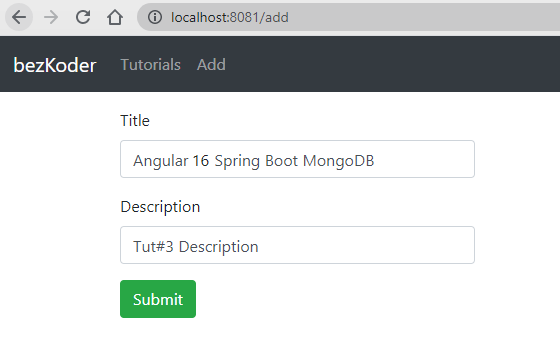
The images below shows screenshots of our System.
– Add a Tutorial document:
– Retrieve all Tutorial documents:

– Click on Edit button to update a document:
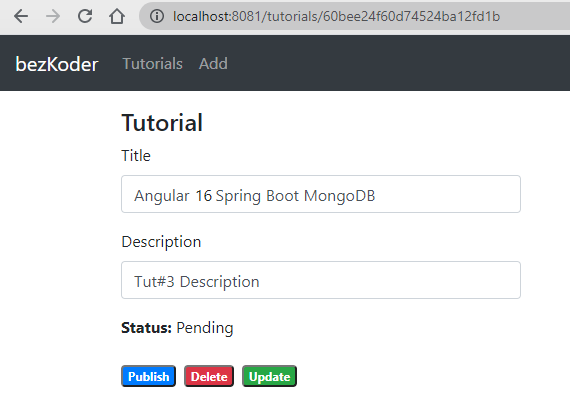
On this Page, you can:
- change status to Published using Publish button
- delete the Tutorial using Delete button
- update the Tutorial details with Update button

If you want to implement Form Validation, please visit:
- Angular 16 Form Validation example (Reactive Forms)
- Angular 16 Template Driven Form Validation example
– Search Tutorials by title (find documents by a column):

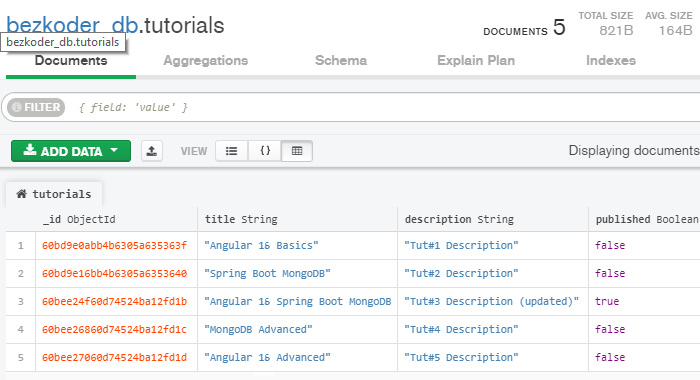
– This is tutorials collection on the MongoDB database:
Angular 16 & Spring Boot MongoDB Architecture
This is the application architecture we will build:
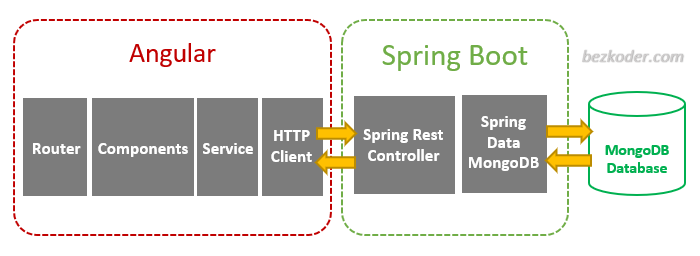
– Spring Boot exports REST Apis using Spring Web MVC & interacts with MongoDB Database using Spring Data MongoDB.
– Angular 16 Client sends HTTP Requests and retrieve HTTP Responses using HttpClient Module, shows data on the components. We also use Angular Router for navigating to pages.
Spring Boot Back-end
Overview
These are APIs that Spring Boot App will export:
| Methods | Urls | Actions |
|---|---|---|
| POST | /api/tutorials | create new Tutorial |
| GET | /api/tutorials | retrieve all Tutorials |
| GET | /api/tutorials/:id | retrieve a Tutorial by :id |
| PUT | /api/tutorials/:id | update a Tutorial by :id |
| DELETE | /api/tutorials/:id | delete a Tutorial by :id |
| DELETE | /api/tutorials | delete all Tutorials |
| GET | /api/tutorials?title=[keyword] | find all Tutorials which title contains keyword |
We make CRUD operations & finder methods with Spring Data MongoDB’s MongoRepository.
Technology
- Java 17 / 11 / 8
- Spring Boot 3 / 2 (with Spring Web MVC, Spring Data MongoDB)
- MongoDB
- Maven
Project Structure
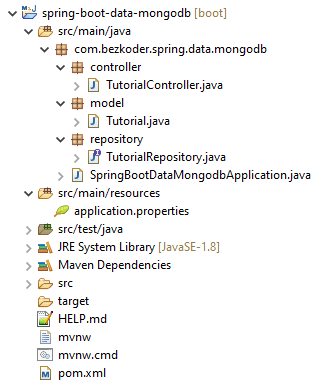
Tutorialdata model class corresponds to entity and table tutorials.TutorialRepositoryis an interface that extends MongoRepository for CRUD methods and custom finder methods. It will be autowired inTutorialController.TutorialControlleris a RestController which has request mapping methods for RESTful requests such as: getAllTutorials, createTutorial, updateTutorial, deleteTutorial, findByPublished…- Configuration for Spring Data MongoDB is in application.properties.
- pom.xml contains dependencies for Spring Boot Web MVC and Spring Data MongoDB.
Create & Setup Spring Boot project
Use Spring web tool or your development tool (Spring Tool Suite, Eclipse, Intellij) to create a Spring Boot project.
Then open pom.xml and add these dependencies:
<dependency> <groupId>org.springframework.boot</groupId> <artifactId>spring-boot-starter-web</artifactId> </dependency> <dependency> <groupId>org.springframework.boot</groupId> <artifactId>spring-boot-starter-data-mongodb</artifactId> </dependency> Configure Spring Data MongoDB
Under src/main/resources folder, open application.properties and add following lines.
spring.data.mongodb.database=bezkoder_db spring.data.mongodb.port=27017 Define Data Model
Our Data model is Tutorial with four fields: id, title, description, published.
In model package, we define Tutorial class.
model/Tutorial.java
package com.bezkoder.spring.data.mongodb.model; import org.springframework.data.annotation.Id; import org.springframework.data.mongodb.core.mapping.Document; @Document(collection = "tutorials") public class Tutorial { @Id private String id; private String title; private String description; private boolean published; ... } @Document annotation helps us override the collection name by “tutorials”.
Create Repository Interface
Let’s create a repository to interact with Tutorials from the database.
In repository package, create TutorialRepository interface that extends MongoRepository.
repository/TutorialRepository.java
package com.bezkoder.spring.data.mongodb.repository; import java.util.List; import org.springframework.data.mongodb.repository.MongoRepository; import com.bezkoder.spring.data.mongodb.model.Tutorial; public interface TutorialRepository extends MongoRepository<Tutorial, String> { List<Tutorial> findByTitleContaining(String title); List<Tutorial> findByPublished(boolean published); } Now we can use MongoRepository’s methods: save(), findOne(), findById(), findAll(), count(), delete(), deleteById()… without implementing these methods.
We also define custom finder methods:
– findByTitleContaining(): returns all Tutorials which title contains input title.
– findByPublished(): returns all Tutorials with published having value as input published.
The implementation is plugged in by Spring Data MongoDB automatically.
You can modify this Repository to work with Pagination, the instruction can be found at:
Spring Boot MongoDB Pagination example with Spring Data
Create Spring Rest APIs Controller
Finally, we create a controller that provides APIs for creating, retrieving, updating, deleting and finding Tutorials.
controller/TutorialController.java
package com.bezkoder.spring.data.mongodb.controller; ... @CrossOrigin(origins = "http://localhost:8081") @RestController @RequestMapping("/api") public class TutorialController { @Autowired TutorialRepository tutorialRepository; @GetMapping("/tutorials") public ResponseEntity<List<Tutorial>> getAllTutorials(@RequestParam(required = false) String title) { } @GetMapping("/tutorials/{id}") public ResponseEntity<Tutorial> getTutorialById(@PathVariable("id") String id) { } @PostMapping("/tutorials") public ResponseEntity<Tutorial> createTutorial(@RequestBody Tutorial tutorial) { } @PutMapping("/tutorials/{id}") public ResponseEntity<Tutorial> updateTutorial(@PathVariable("id") String id, @RequestBody Tutorial tutorial) { } @DeleteMapping("/tutorials/{id}") public ResponseEntity<HttpStatus> deleteTutorial(@PathVariable("id") String id) { } @DeleteMapping("/tutorials") public ResponseEntity<HttpStatus> deleteAllTutorials() { } @GetMapping("/tutorials/published") public ResponseEntity<List<Tutorial>> findByPublished() { } } – @CrossOrigin is for configuring allowed origins.
– @RestController annotation is used to define a controller and to indicate that the return value of the methods should be be bound to the web response body.
– @RequestMapping("/api") declares that all Apis’ url in the controller will start with /api.
– We use @Autowired to inject TutorialRepository bean to local variable.
You can continue with steps to implement this Spring Boot Server (with Github) in the post:
Spring Boot with MongoDB CRUD example using Spring Data
Or Reactive Rest API: Spring Boot, MongoDB, Reactive CRUD example
Run Spring Boot Server
Run Spring Boot application with Maven command: mvn spring-boot:run.
Angular 16 Front-end
Overview
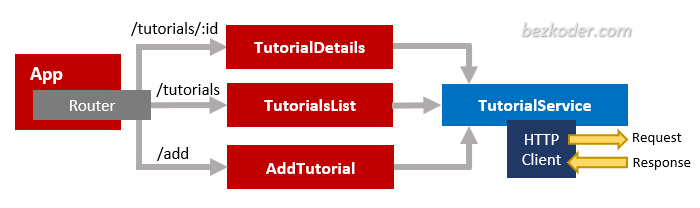
– The App component is a container with router-outlet. It has navbar that links to routes paths via routerLink.
– TutorialsList component gets and displays Tutorials.
– TutorialDetails component has form for editing Tutorial’s details based on :id.
– AddTutorial component has form for submission new Tutorial.
– These Components call TutorialService methods which use Angular HTTPClient to make HTTP requests and receive responses.
Technology
- Angular 16
- Angular HttpClient
- Angular Router
- Bootstrap 4
Project Structure
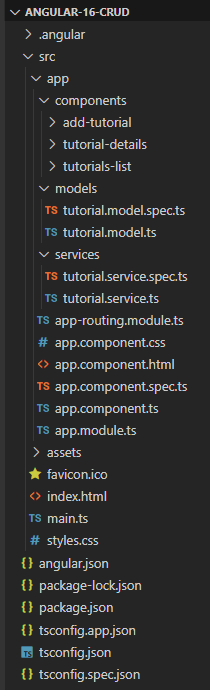
– tutorial.model.ts exports the main class model: Tutorial.
– There are 3 components: tutorials-list, tutorial-details, add-tutorial.
– tutorial.service has methods for sending HTTP requests to the Apis.
– app-routing.module.ts defines routes for each component.
– app component contains router view and navigation bar.
– app.module.ts declares Angular components and import necessary modules.
Setup Angular 16 Project
Let’s open cmd and use Angular CLI to create a new Angular Project as following command:
ng new angular-16-crud ? Would you like to add Angular routing? Yes ? Which stylesheet format would you like to use? CSS We also need to generate some Components and Services:
ng g s services/tutorial ng g c components/add-tutorial ng g c components/tutorial-details ng g c components/tutorials-list ng g class models/tutorial --type=model Set up App Module
Open app.module.ts and import FormsModule, HttpClientModule:
... import { FormsModule } from '@angular/forms'; import { HttpClientModule } from '@angular/common/http'; @NgModule({ declarations: [ ... ], imports: [ ... FormsModule, HttpClientModule ], providers: [], bootstrap: [AppComponent] }) export class AppModule { } Define Routes for Angular AppRoutingModule
There are 3 main routes:
– /tutorials for tutorials-list component
– /tutorials/:id for tutorial-details component
– /add for add-tutorial component
app-routing.module.ts
import { NgModule } from '@angular/core'; import { RouterModule, Routes } from '@angular/router'; import { TutorialsListComponent } from './components/tutorials-list/tutorials-list.component'; import { TutorialDetailsComponent } from './components/tutorial-details/tutorial-details.component'; import { AddTutorialComponent } from './components/add-tutorial/add-tutorial.component'; const routes: Routes = [ { path: '', redirectTo: 'tutorials', pathMatch: 'full' }, { path: 'tutorials', component: TutorialsListComponent }, { path: 'tutorials/:id', component: TutorialDetailsComponent }, { path: 'add', component: AddTutorialComponent } ]; @NgModule({ imports: [RouterModule.forRoot(routes)], exports: [RouterModule] }) export class AppRoutingModule { } Define Model Class
Our main model class Tutorial will be exported in tutorial.model.ts with 4 fields:
idtitledescriptionpublished
models/tutorial.model.ts
export class Tutorial { id?: any; title?: string; description?: string; published?: boolean; } Create Data Service
This service will use Angular HttpClient to send HTTP requests.
You can see that its functions includes CRUD operations and finder method.
services/tutorial.service.ts
import { Injectable } from '@angular/core'; import { HttpClient } from '@angular/common/http'; import { Observable } from 'rxjs'; import { Tutorial } from '../models/tutorial.model'; const baseUrl = 'http://localhost:8080/api/tutorials'; @Injectable({ providedIn: 'root' }) export class TutorialService { constructor(private http: HttpClient) { } getAll(): Observable<Tutorial[]> { return this.http.get<Tutorial[]>(baseUrl); } get(id: any): Observable<Tutorial> { return this.http.get(`${baseUrl}/${id}`); } create(data: any): Observable<any> { return this.http.post(baseUrl, data); } update(id: any, data: any): Observable<any> { return this.http.put(`${baseUrl}/${id}`, data); } delete(id: any): Observable<any> { return this.http.delete(`${baseUrl}/${id}`); } deleteAll(): Observable<any> { return this.http.delete(baseUrl); } findByTitle(title: any): Observable<Tutorial[]> { return this.http.get<Tutorial[]>(`${baseUrl}?title=${title}`); } } Create Angular 16 Components
As you’ve known before, there are 3 components corresponding to 3 routes defined in AppRoutingModule.
- Add new Item Component
- List of items Component
- Item details Component
You can continue with step by step to implement this Angular App in the post:
Angular 16 CRUD example with Rest API
Run the Angular 16 App
You can run this App with command: ng serve --port 8081.
If the process is successful, open Browser with Url: http://localhost:8081/ and check it.
Further Reading
Security: Angular 16 + Spring Boot: JWT Authentication example
Upload: Angular 16 + Spring Boot: File upload/download example
If you want to implement Form Validation, please visit:
- Angular 16 Form Validation example (Reactive Forms)
- Angular 16 Template Driven Form Validation example
Or Pagination: Angular + Spring Boot: Pagination example
Serverless with Firebase:
– Angular 16 Firebase CRUD with Realtime Database
– Angular 16 Firestore CRUD example
– Angular 16 File Upload with Firebase Storage
Source Code
You can find source code for this tutorial at: Spring Boot + Angular example Github.
Conclusion
Now we have an overview of Spring Boot + MongoDB + Angular 16 example when building a fullstack CRUD App.
We also take a look at client-server architecture for REST API using Spring Web MVC & Spring Data JPA, as well as Angular 16 project structure for building a front-end app to make HTTP requests and consume responses.
Next tutorials show you more details about how to implement the system (with Github source code):
– Back-end / Back-end with Reactive API
– Front-end: Angular 16 CRUD example with Rest API
The Angular 16 Client in this tutorial also works well with other databases, you can find instruction in one of the posts:
– Spring Boot + H2
– Spring Boot + MySQL
– Spring Boot + PostgreSQL
– Spring Boot + Oracle
– Spring Boot + SQL Server
– Spring Boot + H2
– Spring Boot + Cassandra
Happy learning, see you again!