

The best 4K projectors can create a massive, high-resolution image that can transform any room into an epic home theater. From movies to games, sports and TV shows, a 4K projector can show all the detail of an Ultra HD TV but far larger than any TV could dream of being. Even better, when you're not watching them, they don't have that looming "black mirror" aspect of a television. This guide contains some of the best projectors I've ever tested, and I've been testing them for over 20 years. If 4K isn't a priority, our list of the best home theater projectors has some cheaper 1080p options. Want something small? Our best portable projector picks let you watch almost anywhere.
Our Picks




PORTABLE PROJECTOR DEALS OF THE WEEK
- $42 (save $358)
- $450 (save $150)
- $550 (save $200)
- $1,000 (save $100)
- $650 (save $350)
What is the best 4K projector overall?
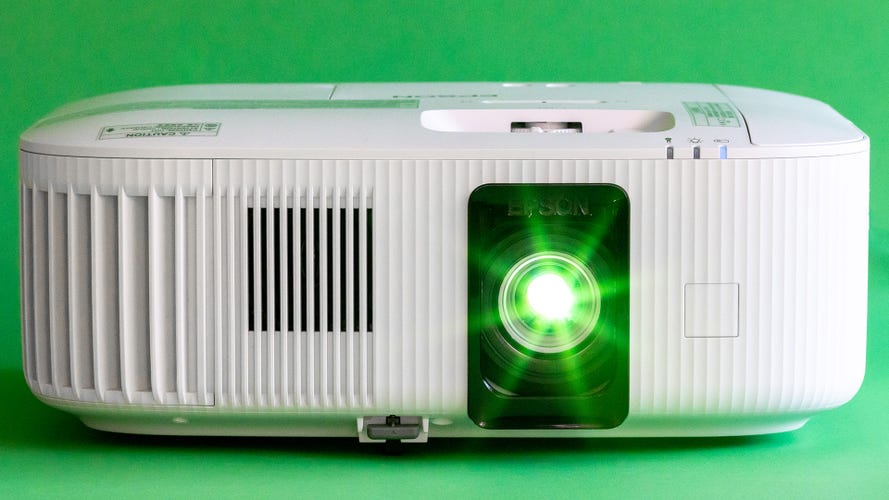
The Epson Home Cinema 5050UB is the best 4K projector overall because it has the perfect balance between image quality and price. Yes, you're paying more than you would for a 1080p projector, but the boost in image quality makes it more than worthwhile. Also, it's a lamp projector, which means it creates light with a user-replaceable lamp. The similar Epson Home Cinema LS11000 uses lasers instead, which never need to be replaced, though they cost more up front. If you're looking for a projector that is more budget-oriented, there's another Epson, the Home Cinema 2350, which doesn't look quite as good but offers a bright, colorful image for a lot less money.
Pros
- Superb overall picture quality
- Excellent contrast ratio
- Motorized lens
- Ample lens shift and motorized zoom
Cons
- Could be quieter
- Chonkers
- Lamp
Why I like it
The Epson Home Cinema 5050UB boasts an excellent contrast ratio, impressive brightness, accurate color and better detail than what's possible with a 1080p projector. It's bigger and more expensive than many 4K projectors, but for that extra size and money, you get a lot of lens shift and zoom, so it will work in far more rooms.
Who should get it
Anyone looking for a serious home theater projector that can create big images for not a lot of money.
Who should avoid
If size is a concern, this is a big projector. There are also two notable drawbacks: It's a lamp-based projector, so every few years (depending on usage), you'll need to replace the lamp. The LS11000 mentioned below is similar to the 5050 but uses lasers (no lamps). The other is that, technically, this is a 1080p x2 projector. It uses pixel shift to create more pixels on screen than a regular 1080p projector, but that, plus the fact it's LCD, means it doesn't have the detail that a DLP-based projector like the other non-Epson projectors on this list can have.
Pros
- Lasers never need to be replaced
- Bright and colorful
- Very natural looking
Cons
- Not as detailed as some 4K DLP projectors
- Performance doesn't quite justify the price
Why I like it
The Epson LS11000 uses lasers to create its light. This lets it turn on and off quickly and create a bright, colorful image. It never needs a lamp replacement, an issue with most older projectors, and it has an impressive dynamic contrast ratio. While it is more expensive compared with the HC5050, over the life of the projector, they'll cost about the same. The 5050 performs better in a few areas, but overall, the LS11000 creates a deeply colorful, highly detailed image.
Who should get it
Anyone who's interested in the performance of the Epson 5050 but wants a projector that's a little easier to live with and without the need to replace lamps every few years.
Who should avoid
Like its 5050 sibling, the LS11000 uses pixel shift on 1080p LCD chips to create more pixels on screen than would be possible with just those imaging chips themselves. The result is an image with greater detail than 1080p, but less than the 4K DLP projectors like the non-Epson models elsewhere on this list. The overall image of the LS11000 is fantastic, and better than most other options, but it is not quite as sharp.
Pros
- Ridiculously bright
- Impressively quiet
- All you need for an epic movie night anywhere
Cons
- Brutally expensive
- Did I mention it's expensive
- Who is this for, exactly?
The Anker Nebula X1 is the brightest projector I've ever measured. It's capable of truly remarkable light output. It also has a decent contrast ratio and color.
Why I like it:
This thing is bonkers bright. It's so bright that depending on your screen and room, you might need to drop its light output so it's comfortable to watch.
Who is this for?
Anyone who wants a super bright image and doesn't mind paying for it. If you want a huge image for outdoor movie nights, the X1 is designed to be portable with a built-in handle and Google TV. You'll still need to run an extension cord, as it is not battery powered.
Who shouldn’t buy it
As impressive as it is, the X1 is extremely expensive. While it does have some zoom, it's not as much as the Epsons mentioned above. Its lens shift isn't as good either, as it's a pivot not a traditional shift. So it's not quite as good for permanent placement (for some homes, anyway). Also, some people will find the artifacts created by the 3 laser light engine to be somewhat annoying.
The 1.2x zoom lens.
Pros
- Excellent contrast
- Accurate colors
- Bright
Cons
- Expensive
- Short throw is not for everyone
Why I like it
The BenQ X500i is a short-throw projector, meaning it only needs 4 to 5 feet to create a 100-inch image. Compare that to "regular" projectors, which need from 9 to 11 feet. The X500i's performance is fantastic. It creates a punchy, high-contrast, colorful, detailed image that's among the best I've ever tested. If I could fit this projector in my home theater, I would. Alas, short-throw projectors aren't for everyone.
Who should get it
Anyone with a smaller room, or the ability to mount a projector just a few feet from their screen. Think "coffee table" placement, or the ceiling above a coffee table.
Who should avoid
Short-throw projectors aren't ideal for many rooms. It can be in the way, or in your eyeline, making it a hassle to live with if you don't have a room that suits its short throw.
Pros
- 4K at a more affordable price
- Compact design
- Very bright
Cons
- Contrast is pretty mediocre
- Loud at max brightness
- Technically 4K, but other projectors are sharper
Why I like it
The Epson Home Cinema 2350 is a reasonably priced 4K projector that's bright, offers good detail and produces a great image overall. Its contrast ratio is below average, but on the plus side, it has accurate colors, zoom and lens shift. Also, like the other Epson projectors earlier on this list, the 2350 uses pixel shift with two 1080p imaging chips to create a 4K image. For similar money, we like the BenQ HT2060 a little better, but that's not 4K, so it doesn't make the cut for this guide. It is in our guide for the best home theater projectors, however.
Who should get it
Anyone looking for a compact, extremely bright 4K projector should consider this. Few projectors this bright look this good.
Who should avoid
The 2350's image quality is good, but not great. Going with a 4K DLP projector (the non-Epson models on this list, for example) will get you more detail. Resolution is just one aspect of picture quality, and not the most important. If you don't absolutely need 4K, there are other options that look better overall.
The Xgimi Horizon Ultra with it's sliding door closed. It opens automatically when you turn on the power.
Pros
- Great design
- Quiet (usually)
- Bright
Cons
- Contrast ratio is poor
- Random bugs
- No input button on the remote
Why I like it
The Xgimi Horizon Ultra is a compact, cube-shaped projector that throws out a ton of light. It has decent speakers and Google TV streaming. Its stylish design would likely blend in better in many rooms than more conventionally shaped projectors. It even has a slide-down cover that protects the lens.
Who should get it
Anyone who still wants a "home" in their "home theater." The light output and easy streaming make this a great TV replacement without looking like a cheap piece of plastic tech.
Who should avoid
While the Horizon Ultra is bright, its contrast ratio is fairly poor, so the other projectors on this list look better. They're a lot bigger and not as bright, however. So, if you're looking for the best image quality, there are better options.
Pros
- Highly accurate, lifelike color
- Lots of light
- Great size
Cons
- Contrast ratio is below average
- No zoom
Why I like it
The BenQ GP520 competes with other compact "lifestyle" projectors like the Xgimi and JMGO mentioned elsewhere on this list, but has fantastically lifelike color. If you ditch the accurate color mode, it can put out some impressively bright images. In my review I called it "a very good, though not quite great, projector" which is high praise from me.
Who should get it
Anyone looking for something with excellent image quality, quiet operation, and a compact size.
Who should avoid
There are other options on this list that offer a brighter picture and/or a better contrast ratio. Overall, the GP520 looks really good, but there are some that look a little better. Those are often larger and more expensive, however. Also, notably, it has no zoom. So it won't fit as easily in many rooms.
Pros
- High brightness in a small(-ish) projector
- Surprisingly good speakers
Cons
- Colors aren't accurate
- The gimbal design is still weird
Why I like it
The JMGO N1S Pro 4K is mounted on a gimbal that allows for easy pivoting and twisting to align it where you want it. That said, I do find gimbaled designs to be overpriced and unnecessary for most people since setting up a projector is usually neither difficult nor time-consuming. If gimbals are your thing, though, the N1S Pro 4K creates a good image overall, with above-average brightness and contrast ratio.
Who should get it
Anyone who wants to save a few minutes every time they set up a projector. If you're moving it daily, or multiple times a day, this can be a minor quality-of-life improvement.
Who should avoid
You can do everything a gimbal does on your own by propping up the front of any projector with either its built-in feet or anything you have handy, like a book or two. Gimbals add cost and complexity, and if you're not moving it around regularly, you're paying for a feature and a projector that's outperformed by other options, especially with its below-average color.
Pros
- Excellent price for 4K
- Great diminutive size
- Reasonably bright
Cons
- Colors aren't impressive
- Not particularly bright
- No zoom
The JMGO N1S 4K is a compact 4K projector with decent performance and a great price. The Epson Home Cinema 2350 mentioned above is brighter, but it uses LCD instead of DLP, so it's not quite as sharp and detailed.
Why I like it:
The N1S 4K looks like its more expensive brother, the N1S Pro, but it's also a lot smaller. While the base N1S doesn't have the performance of the Pro, it's a lot cheaper.
Who should get it
Someone who wants a decently-performing projector that's easy to carry and doesn't cost a lot.
Who shouldn’t buy it
Other projectors on this list offer better image quality, though they're larger and cost more. There's also no zoom, so to make the image larger or smaller you need to physically move the projector close or farther from the screen. If you have a screen already, and a place to put the projector, this might not work.
What we updated:
August 2025: Added the Anker Nebula X1, JMGO N1S 4K and BenQ GP520 as picks.
May 2025: Added the BenQ W2720i to the Other Projectors We've Tested section.
Compare the best 4K projectors
Prices at time of review. See the individual reviews for more details.
**As measured by CNET.
| Brand | Model | Price | Lumens** | Contrast ratio** |
|---|---|---|---|---|
| Anker | Cosmos 4K SE | $1,300 | 1,219 | 232:1 |
| Anker | Nebula X1 | $3,000 | 2,383 | 1,544:1 |
| BenQ | GP520 | $1,500 | 1,258 | 369:1 |
| BenQ | X300G | $1,900 | 700 | 1,762:1 |
| BenQ | X500i | $1,700 | 1,549 | 1,990:1 |
| BenQ | W2720i | $2,200 | 1,003 | 604:1 |
| Epson | HC 2350 | $1,300 | 2,075 | 348:1 |
| Epson | HC 5050 | $2,500 | 1,732 | 5,203:1 |
| Epson | LS11000 | $4,000 | 1,378 | 1,808:1 |
| JMGO | N1S Pro | $2,000 | 1,198 | 526:1 |
| JMGO | N1S 4K | $1,000 | 575 | 1,196:1 (estimate) |
| Optoma | UHZ50 | $2,800 | 1,486 | 1,007:1 |
| Xgimi | Horizon S Max | $1,900 | 1,300 | 621:1 |
| Xgimi | Horizon Ultra | $1,300 | 1,333 | 316:1 |
Other projectors we tested
Anker Nebula Cosmos Laser 4K: Since it has a handle and a compact size, the Cosmos Laser 4K is technically portable, but there's no battery, so you'll need to plug it in. It's also nice and bright, but the other downsides -- lack of zoom, average overall image quality and a steep price for what you get -- keep it off the list. Read our Anker Nebula Cosmos Laser 4K Projector review.
Anker Nebula Cosmos 4K SE: The SE version of the Cosmos 4K is a little dimmer but a fair amount cheaper. It has all the same pros and cons, but the lower cost makes it more interesting. We like our top picks better, but this one was close to making the list. Check out our full review of the Anker Nebula Cosmos 4K SE.
BenQ TK860i: The TK860i is a decent step up in detail compared to 1080p projectors, though overall performance isn't quite as good as other BenQ options. It's been discontinued, but if you can find it used, it might be a good deal. Read our BenQ TK860i review.
BenQ W2720i: The W2720i is a classy-looking projector that's longer-throw than the BenQ X500i but shorter-throw than several others on this list. While more expensive than the X500i, its performance is worse. Read our full review of the BenQ W2720i.
LG HU810PW: The HU810PW costs about the same as the Optoma UHZ50 and is also a laser-powered DLP projector with 4K resolution. It has better lens shift and zoom and is quieter. However, the contrast ratio is poor, so it doesn't look nearly as good overall as other 4K projectors we've tested. Read our LG HU810PW review.
Optoma GT2100HDR: The GT2100HDR is a short-throw projector like the X500i we recommend above. While the Optoma is cheaper, the X500i is significantly better in every way. Check out our full review of the Optoma GT2100HDR.
Xgimi Horizon S Max: The Horizon S Max looks like the Horizon Ultra we recommend above, just with a gimbaled base for "easier" setup. We're pretty "meh" on gimbals, especially when they add a lot to the price like this one does. Check out our full review of the Xgimi Horizon S Max.
Factors to consider when choosing a 4K projector
Picture quality. Even the best projectors don't have the image quality of a modern TV, especially OLED. However, they are able to produce massive images for not a lot of money, comparatively. Images that size benefit from as much resolution as possible, so you'll typically see a benefit moving to 4K from a 1080p projector. The two main considerations beyond that are overall brightness, which determines how large an image you can make and how easy it is to watch, and contrast ratio, which determines how "punchy" it looks.
Where are you using it? A 4K projector can be used just about anywhere. They'll benefit from an actual screen, though, since their image quality is often better than a budget projector. If you want to replace a TV, consider a model with built-in streaming. Conveniently, most have this feature now. Even those that don't will usually have an HDMI input near a USB connector so you can power a streaming stick. Our top Epson picks are rather larger, but the others are small enough to be fairly portable.
What about X spec? Projector specs are often wildly exaggerated. If a company states a projector is 2,000 lumens, it is probably brighter than a 500-lumen projector, but 1,500- and 1,700-lumen projectors are probably about the same. Even if they are different by that exact amount, it'd be hard to see that difference, even viewed side-by-side.
How much should you spend? Typically, 4K projectors start at around $1,000. There are decent options for less than $2,000 and some great ones for less than $3,000. Generally, spending more gets you greater light output and sometimes a better image overall, but not always.
What features should you look for? There aren't many features you really need in a projector, beyond overall brightness, contrast and image quality in general. Lens shift and zoom are handy if you want more flexibility in placement. Most projectors now have Google TV streaming built in, or at least come with a dongle you install during setup. No projector has great speakers, though some are better than others, so you should definitely consider getting a receiver and speakers or a soundbar. These connect with HDMI as long as the projector has ARC or eARC, which nearly all of them do.
How we test 4K projectors
All the projectors we review at CNET go through the same testing process that includes objective measurements and side-by-side subjective evaluation. I've been reviewing projectors for over 20 years and have used one (OK, many over the years) as my main "TV" since I started reviewing them. I'm also Imaging Science Foundation certified and did training at the National Institute of Standards and Technology to correctly measure displays. I use specialized test equipment, including a C6 HDR5000 colorimeter, a Minolta LS-100 luminance meter and an AEMC CA813 illuminance meter. The data is collected and collated by Portrait Displays CalMan Ultimate software. All projectors are initially set up using their most accurate color temperature and color modes. Test patterns, sent from a Portrait Displays VideoForge PRO 8K, are then used to adjust the various picture settings so the projector looks its best before measurement and evaluation. Contrast ratios are measured in each lamp or LED/laser and iris mode (when available). Once the projectors are fully set up and objectively measured, we watch a variety of content, including TV, movies and games, both with the projector by itself, and compared side-by-side with two direct competitors.
With 4K projectors, like portable and other home theater projectors, I'm looking for the three most important picture quality aspects: contrast ratio, overall light output and color reproduction. Contrast ratio is the most important part of any projector's performance. It's the difference between the darkest part of the image and the brightest. While certain TV technologies, like OLED, can create a black that's the actual absence of light, no projector technology can do this. Therefore, projector contrast ratios are far lower. It's the difference between a washed-out and "flat" image and one that's more lifelike and that "pops." The better projectors will have a measured contrast ratio in the thousands. Most are between 500 and 1,000:1. The median contrast ratio for all the projectors we've measured in the last few years is 468:1, and the average, bumped up by several high-priced projectors, is 876:1. Overall light output, measured in lumens, is not only how bright the image is, but how large you can make it and still have a watchable image. A few lumens difference doesn't matter, but several hundred can be the difference between a dim, boring image and one that really pops. Color is a complex topic, but after years of testing, including dozens of "face-offs" with non-techy and non-reviewers, accurate color almost always wins out over under- or oversaturated color. The most accurate projectors produce lifelike colors that are very natural to watch.
Light output is the second most important factor, because it's not only how bright the image appears on your wall, but also how big an image you can produce. Most modern projectors are significantly brighter than projectors from even 10 years ago. We measure brightness in candelas per square meter (cd/m2) and then convert to estimated lumens for ease of comparison. It's important to note that we use the most accurate color temperature mode for our brightness comparisons, but we'll note when a less-accurate mode is significantly brighter. Most of the projectors we test are between 1,000 and 2,000 lumens, with battery-powered models far less, and some specialized projectors even higher. The average brightness for the projectors we've measured over the last few years is 901 lumens.
Color accuracy is the last major factor. No projector can truly take advantage of HDR, Dolby Vision or wide color gamut, but some can do more than others. Generally, we're satisfied with accurate colors, but adding HDR effects is a bonus. Most home theater projectors we test are fairly accurate. Budget models, those that prioritize brightness over everything, along with devices from newcomers to the projector space often have wildly inaccurate colors that result in a very unnatural image.
Other factors, like video processing and HDR processing, are evaluated in the viewing tests. These are rarely a major factor in projector performance, but some models still use older chips that have issues.
The best projector will have a high contrast ratio, high brightness and great color. Those are difficult to do at the same time, but as long as the balance works and it looks better than its competitors at a similar price, it's a winner.
For more info, check out how CNET tests projectors.
