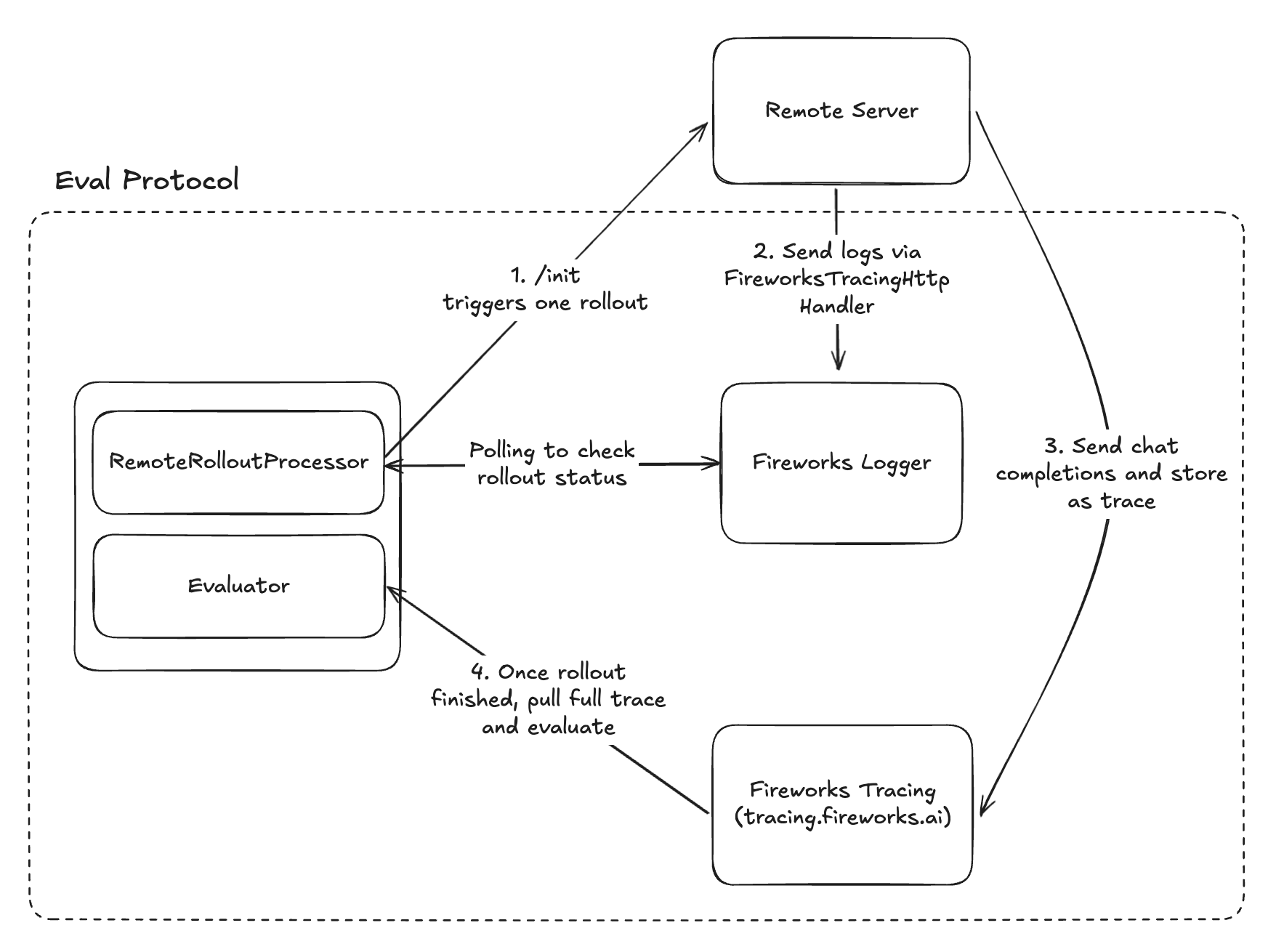
If you already have an agent, you can integrate it with Eval Protocol by using the RemoteRolloutProcessor.RemoteRolloutProcessor delegates rollout execution to a remote HTTP service that you control. It’s useful for implementing rollouts with your existing agent codebase by wrapping it in an HTTP service.
When making model calls in your remote server, include the following metadata in your traces and logs so that eval-protocol can correlate them with the corresponding EvaluationRows during result collection. RemoteRolloutProcessor automatically generates this and sends it to the server, so you don’t need to worry about wrangling metadata.
Fireworks Tracing: Handling InitRequest in your Server
This section shows how to parse the InitRequest fields and call your model. Note: the model_base_url is a tracing.fireworks.ai URL that proxies your model calls so Fireworks can capture full traces for each rollout.Below is a minimal FastAPI server showing how to wire this together.
remote_server.py
Copy
Ask AI
@app.post("/init")def init(req: InitRequest): if not req.messages: raise ValueError("messages is required") model = req.completion_params.get("model") if not model: raise ValueError("model is required in completion_params") # Spread all completion_params (model, temperature, max_tokens, etc.) completion_kwargs = {"messages": req.messages, **req.completion_params} if req.tools: completion_kwargs["tools"] = req.tools # Build OpenAI client from InitRequest # You can also use req.api_key instead of an environment variable if preferred. client = OpenAI( base_url=req.model_base_url, api_key=os.environ.get("FIREWORKS_API_KEY"), ) completion = client.chat.completions.create(**completion_kwargs)
The RemoteRolloutProcessor detects rollout completion by polling structured logs sent to Fireworks Tracing. Your remote server should add FireworksTracingHttpHandler as the logging handler, a RolloutIdFilter, and log completion status using structured Status objects:
remote_server.py
Copy
Ask AI
import loggingfrom eval_protocol import Status, InitRequest, FireworksTracingHttpHandler, RolloutIdFilter# Configure Fireworks tracing handlerfireworks_handler = FireworksTracingHttpHandler()logging.getLogger().addHandler(fireworks_handler)@app.post("/init") def init(request: InitRequest): # Create rollout-specific logger with filter rollout_logger = logging.getLogger(f"eval_server.{request.metadata.rollout_id}") rollout_logger.addFilter(RolloutIdFilter(request.metadata.rollout_id)) try: # Execute your rollout here # Then log successful completion with structured status rollout_logger.info( f"Rollout {request.metadata.rollout_id} completed", extra={"status": Status.rollout_finished()} ) except Exception as e: # Log errors with structured status rollout_logger.error( f"Rollout {request.metadata.rollout_id} failed: {e}", extra={"status": Status.rollout_error(str(e))} )
import osimport loggingimport multiprocessingfrom eval_protocol import FireworksTracingHttpHandler, InitRequestdef execute_rollout_step_sync(request): # Set in the CHILD process os.environ["EP_ROLLOUT_ID"] = rollout_id logging.getLogger().addHandler(FireworksTracingHttpHandler()) # Execute your rollout here@app.post("/init")async def init(request: InitRequest): # Do NOT set EP_ROLLOUT_ID here; set it in the child p = multiprocessing.Process( target=execute_rollout_step_sync, args=(request), ) p.start()