22
$\begingroup$

I got this matrix

 120 100 80 40 20 10 5 0 120 64.21 58.20 51.20 56.37 47.00 45.61 46.86 2.16 100 62.84 57.80 50.60 51.32 39.43 39.30 42.80 0.89 80 62.62 56.20 51.20 51.61 46.23 37.20 42.20 5.32 40 62.05 52.10 44.20 48.79 42.22 35.16 41.80 1.81 20 61.65 50.90 42.30 46.23 44.83 32.70 41.50 6.24 10 59.69 50.20 40.10 40.20 44.28 32.80 39.90 12.31 5 59.05 49.20 40.60 38.90 44.10 30.80 32.80 9.91 0 56.20 49.10 40.50 38.60 36.20 32.20 31.50 0.00 

I know how to plot heatmap for the values inside by specifying it as numpy array and then using

ax = sns.heatmap(nd, annot=True, fmt='g') 

But can someone help me how do I include the column and row labels? The column labels and row labels are given (120,100,80,42,etc.)
$\endgroup$
2
  • $\begingroup$ Also the generated matrix if I am not wrong(will confirm) plots the matrix as it is via colours densities, so we know what is what(look at annotations, xticklabels, yticklabels etc..).... Docs might help...seaborn.pydata.org/generated/seaborn.heatmap.html $\endgroup$ Commented May 16, 2018 at 19:25
  • $\begingroup$ Thank you man, I didn't notice the tiny detail for list in it. $\endgroup$ Commented May 18, 2018 at 4:59

2 Answers 2

24
$\begingroup$

I got your problem like this way: You want to show labels on the x and y-axis on the seaborn heatmap. So for that, sns.heatmap() function has two parameters which are xticklabels for x-axis and yticklabels for y-axis labels.

Follow the code snippet below:

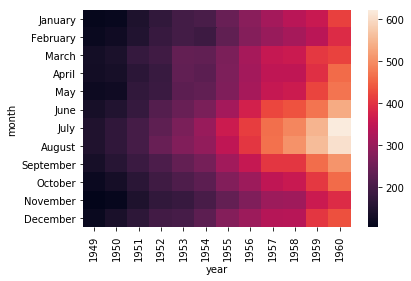
import seaborn as sns # for data visualization flight = sns.load_dataset('flights') # load flights datset from GitHub seaborn repository # reshape flights dataset in proper format to create seaborn heatmap flights_df = flight.pivot('month', 'year', 'passengers') sns.heatmap(flights_df)# create seaborn heatmap 

Output >>> enter image description here

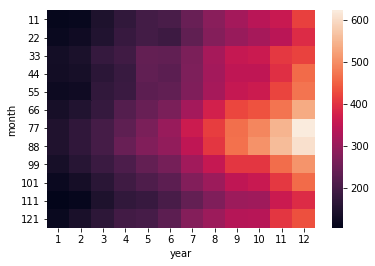
Now, we are changing x and y-axis labels using xticklabels and yticklabels sns.heatmap() parameters.

x_axis_labels = [1,2,3,4,5,6,7,8,9,10,11,12] # labels for x-axis y_axis_labels = [11,22,33,44,55,66,77,88,99,101,111,121] # labels for y-axis # create seabvorn heatmap with required labels sns.heatmap(flights_df, xticklabels=x_axis_labels, yticklabels=y_axis_labels) 

Output >>> enter image description here

For an in-depth explanation follow the seaborn heatmap tutorial.

$\endgroup$
1
  • $\begingroup$ Can we have different colours for labels of the heatmap? $\endgroup$ Commented Sep 7, 2020 at 7:35
9
$\begingroup$

Here's how we can add simple X-Y labels in sns heatmap:

s = sns.heatmap(cm_train, annot=True, fmt='d', cmap='Blues') s.set(xlabel='X-Axis', ylabel='Y-Axis') 

OR

s.set_xlabel('X-Axis', fontsize=10) s.set_ylabel('Y-Axis', fontsize=10) 
$\endgroup$

Start asking to get answers

Find the answer to your question by asking.

Ask question

Explore related questions

See similar questions with these tags.