


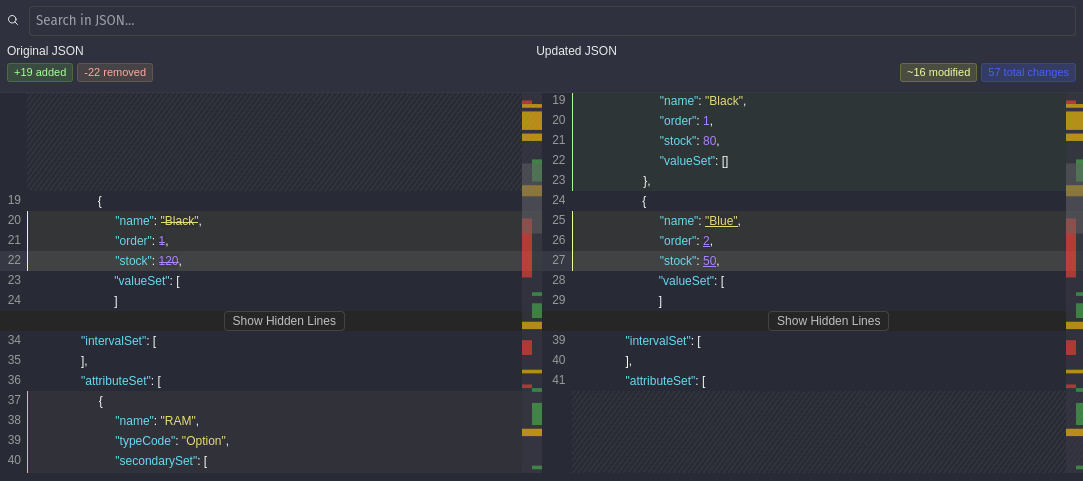
A high-performance React component for visually comparing large JSON objects. Built on top of json-diff-kit, this viewer supports virtual scrolling, search functionality, dual minimap, and customizable theming.
- Virtualized Rendering – Efficient DOM updates using
react-window - Search Highlighting – Find matches and scroll directly to them
- Dual Mini Map – Scrollable minimap for better navigation
- Line Count Statistics – Display added, removed, and modified line counts
- Object Count Statistics – Count objects when using compare-key method
- Customizable Styles – Add your own class names and themes
👉 Try it now - Interactive demo with live examples
npm install virtual-react-json-diff # or yarn add virtual-react-json-diff # or pnpm add virtual-react-json-diffimport { VirtualDiffViewer } from "virtual-react-json-diff"; const oldData = { name: "Alice", age: 25 }; const newData = { name: "Alice", age: 26, city: "NYC" }; export default function App() { return ( <VirtualDiffViewer oldValue={oldData} newValue={newData} height={600} showLineCount={true} showObjectCountStats={false} /> ); }Enable line-level statistics with showLineCount={true}:
<VirtualDiffViewer oldValue={oldData} newValue={newData} showLineCount={true} />;Displays: +5 added lines, -3 removed lines, ~2 modified lines, 10 total line changes
Enable object-level counting when using compare-key method:
<VirtualDiffViewer oldValue={oldData} newValue={newData} showObjectCountStats={true} differOptions={{ arrayDiffMethod: "compare-key", compareKey: "id" }} />;Displays: +2 added objects, -1 removed objects, ~3 modified objects, 6 total object changes
Requirements: Only works with arrayDiffMethod: "compare-key" and requires a valid compareKey.
| Prop | Type | Default | Description |
|---|---|---|---|
oldValue | object | — | The original JSON object to compare (left side). |
newValue | object | — | The updated JSON object to compare (right side). |
height | number | — | Height of the diff viewer in pixels. |
hideSearch | boolean | false | Hides the search bar if set to true. |
searchTerm | string | "" | Initial search keyword to highlight within the diff. |
leftTitle | string | — | Optional title to display above the left diff panel. |
rightTitle | string | — | Optional title to display above the right diff panel. |
onSearchMatch | (index: number) => void | — | Callback fired when a search match is found. Receives the match index. |
differOptions | DifferOptions | Default config | Advanced options passed to the diffing engine. |
showSingleMinimap | boolean | false | If true, shows only one minimap instead of two. |
className | string | — | Custom CSS class for styling the viewer container. |
miniMapWidth | number | 40 | Width of each minimap in pixels. |
inlineDiffOptions | InlineDiffOptions | {'mode': 'char'} | Options for fine-tuning inline diff rendering. |
showLineCount | boolean | false | Display line count statistics (added, removed, modified lines). |
showObjectCountStats | boolean | false | Display object count statistics when using compare-key method. |
getDiffData | (diffData: [DiffResult[], DiffResult[]]) => void | - | Get difference data and make operations |
const differOptions = { detectCircular: true, maxDepth: 999, showModifications: true, arrayDiffMethod: "compare-key", compareKey: "userId", ignoreCase: false, recursiveEqual: false, }; <VirtualDiffViewer oldValue={oldData} newValue={newData} differOptions={differOptions} />;import { calculateObjectCountStats } from "virtual-react-json-diff"; const stats = calculateObjectCountStats(oldValue, newValue, "userId"); // Returns: { added: 2, removed: 1, modified: 3, total: 6 }The component exposes a root container with class diff-viewer-container. You can pass your own class name via the className prop to apply custom themes.
Built on top of the awesome json-diff-kit.
MIT © Utku Akyüz
Pull requests, suggestions, and issues are welcome!