
Export Datasources to XML
Last updated - 23 July, 2025
You can use LogicMonitor’s REST API to programmatically export one or all datasources to XML.
As with all of our API requests, authentication is required.
Export All Datasources to XML
HTTP Method:GET
URI: /setting/datasources?format=xml
Export One Datasource to XML
HTTP Method:GET
URI: /setting/datasources/{id}?format=xml
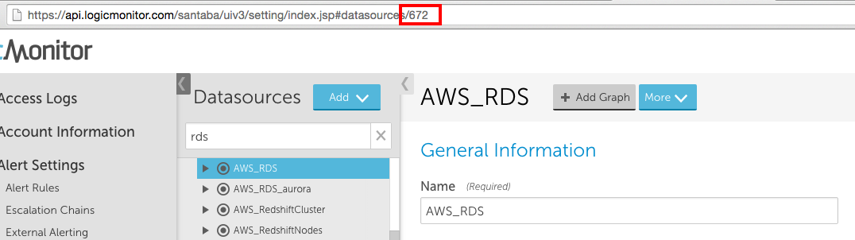
Where the id should be the datasource id. You can find this id in the UI by looking at the URL of the datasource definition:
Example 1: Export All Datasources to XML
The following Python script returns XML for all datasources in api.logicmonitor.com and saves it to a file allDatasources.xml.
#!/bin/env python import requests import json import hashlib import base64 import time import hmac #Account Info AccessId ='J62te62B8u7WnCR846h6' AccessKey ='{[H^LX=^Zg^32yp-x(-2Bq22vZ~^u-k3)8!9[7U^' Company = 'api' #Request Info: Get xml for all datasources httpVerb ='GET' resourcePath = '/setting/datasources' queryParams = '?format=xml' #Construct URL url = 'https://'+ Company +'.logicmonitor.com/santaba/rest' + resourcePath + queryParams #Get current time in milliseconds epoch = str(int(time.time() * 1000)) #Concatenate Request details requestVars = httpVerb + epoch + resourcePath #Construct signature hmac1 = hmac.new(AccessKey.encode(),msg=requestVars.encode(),digestmod=hashlib.sha256).hexdigest() signature = base64.b64encode(hmac1.encode()) #Construct headers auth = 'LMv1 ' + AccessId + ':' + signature.decode() + ':' + epoch headers = {'Content-Type':'application/json','Authorization':auth} #Make request response = requests.get(url, headers=headers) #Print status of response and save response body to file print('Response Status:',response.status_code) file_ = open('allDatasources.xml', 'w') file_.write(response.content) file_.close()Python 3
Example 2: Export One Datasource to XML
The following Python script returns XML for the datasource with id 345 in api.logicmonitor.com and saves it to a file dat345.xml.
#!/bin/env python import requests import json import hashlib import base64 import time import hmac #Account Info AccessId ='J62te62B8u7WnCR846h6' AccessKey ='{[H^LX=^Zg^32yp-x(-2Bq22vZ~^u-k3)8!9[7U^' Company = 'api' #Request Info: Get xml for datasource 345 httpVerb ='GET' resourcePath = '/setting/datasources/345' queryParams = '?format=xml' #Construct URL url = 'https://'+ Company +'.logicmonitor.com/santaba/rest' + resourcePath + queryParams #Get current time in milliseconds epoch = str(int(time.time() * 1000)) #Concatenate Request details requestVars = httpVerb + epoch + resourcePath #Construct signature hmac1 = hmac.new(AccessKey.encode(),msg=requestVars.encode(),digestmod=hashlib.sha256).hexdigest() signature = base64.b64encode(hmac1.encode()) #Construct headers auth = 'LMv1 ' + AccessId + ':' + signature.decode() + ':' + epoch headers = {'Content-Type':'application/json','Authorization':auth} #Make request response = requests.get(url, headers=headers) #Print status of response and save response body to file print('Response Status:',response.status_code) file_ = open('dat345.xml', 'w') file_.write(response.content) file_.close()Python 3
